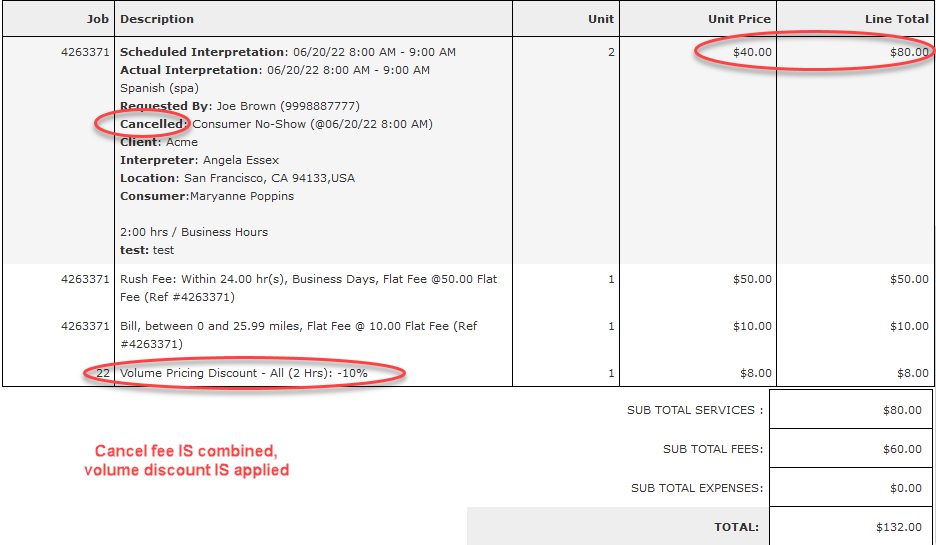
Volume pricing can be used if you wish to have a discount applied based on volume (using the total duration of all jobs added to the same invoice). The discount is applied on the invoice at the time the invoice is created.
The standard invoice template layout needs to be used. Volume pricing cannot be applied if the invoice layout is using the customized column builder invoice format.
How to set it up:
- Enable the flag labeled “Enable Volume Pricing?” on the General tab of a Rate Plan.
- Navigate to Volume Pricing tab and click “Add Price Tier”
- The “Lower Bound (Mins)” & “Upper Bound (Mins)” denote the duration parameters to apply the volume pricing discount. The total duration of all jobs added to a given invoice needs to fall within this range for the discount to apply.
- The “Disc. %(-/+)” field should contain a positive number in decimal format to represent percentage. E.g., value of -0.10 in the field will represent 10% discount.
- In “Applies To” column, select the type of service the discount is to apply for. Only durations of jobs of that service type will be totaled to determine whether the discount should be applied. If there are discounts for multiple services defined, durations for job per each service will be totaled and checked against the bounds for the matching service. If multiple discounts are to show on the same invoice, they will be listed as separate line items.
- The example below will apply 10% discount to an invoice where total duration of all Face to Face jobs is between 40 and 120 minutes.
 Notes: If you wish for the discount to be subtracted, you must use a minus sign in front of the 0.10, otherwise it adds 10% to the charge.
The volume discount only applies to jobs that are invoiced monthly.
Volume discount does not apply to Rush fee, incidentals or other fees on the rate plan.
The volume discount is not applied to the Cancel fee if the cancel fee is a separate line item. If the Cancel fee is combined with the Interpretation, the volume discount is applied to the cancel fee charges.