Video Rate Plans - Setting Tiered Minimum Duration
- On any Rate Plan, check the 'Enable Cliffs' setting on the General tab and click Save
- Click on the Base Rates or Language Tiers tab to enter in cliff rate values.
- Additional fields for Cliff options are now available on each set of service rates. These fields default to zero and do not need to be filled in with any other value if you do not want to use a cliff rate on all service rates within the rate plan.
- Enter the Cliff (minutes) when the cliff begins and the Rate (per hour) that will be billed after the cliff (minutes) is reached.
- In this example below, the customer rate is $40/hr for the first 60 minutes. At 60 minutes, the hourly rate adjusts to $35/hr for the remainder of the job.
Using Tier Min. Duration (minutes) in conjunction with Cliff Rates
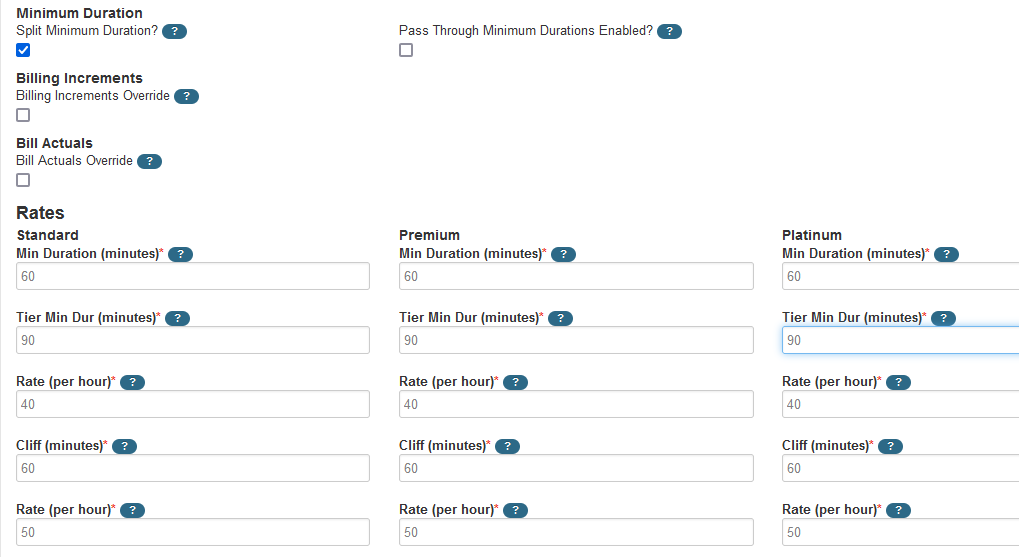
On any set of service rates, check the Split Min. Duration checkbox. This enables an additional field for each rate on the service called Tier Min Dur (minutes)
This additional field is used to define minimum durations paid after two different lengths of time. The field defaults to zero and needs to be given a value for each set of service rates, otherwise the Tiered Min. Duration will be zero if the job runs longer than the initial Min. Duration set.
For example: The initial Min. Duration set at 60 minutes. The Tier Min. Duration set at 90 minutes.
This means a 40-minute job will pay at least 60 minutes (the initial minimum duration), but if the job goes over 65 minutes, the minimum duration moves to 90 minutes instead of 60 minutes.