
SMS is a way for jobs to be offered out manually via text messaging. The job offer will be sent to the interpreter phone number on their profile. A job offered via SMS will also display on the interpreter portal Offered Jobs section. The interpreter can accept/decline the job via the interpreter portal, or as discussed below.
Additional fees to enable and use SMS? Please discuss with Account Manager
If agency already has a phone number that is being used ONLY for phone scheduled or ONLY for OPI OD, that number can ALSO be used for the SMS functionality. Therefore, the agency would not need a 2nd phone number.
SMS setup process
SMS phone number: Please indicate a preferred area code for the number you will use as the sender.
If you would like to receive responses via email, which email addresses should they forward to?
If you prefer not to receive email responses to SMS, we can configure an 'unattended box' auto-response that the contact will receive if they reply.
If you would also like an auto-reply configured, please send us the default message to reply if interpreter responds to a text (160 characters max).
Auto-reply is used when the following conditions are met:
- Company Configuration "Enable Offer Actions via SMS" is unchecked.
- Interpreter is offered a single job via SMS and replies 'yes' or 'no'
- Auto-reply SMS message is sent to interpreter as it is entered in the Auto-Reply SMS template
or
- Company Configuration "Enable Offer Actions via SMS" is unchecked.
- Interpreter is offered multiple jobs via SMS and replies 'yes' or 'no'
- Auto-reply defaults to "More than one job available to take action on. Please accept jobs via interpreter portal"
Job Offers Sent Via SMS
SMS messages are never sent out by the system as an automated action.
If job offer was sent via SMS only:
Scheduler takes the action to re-send job offer from the Assign Interpreter > Offered tab - SMS offer is sent again
Bulk Action - Send Job Offers:
Sends offer via Email only, never SMS
Daily Digest:
Sends notification via Email only, never SMS
Allowing interpreters to reply to SMS job offers
If you are planning on sending out job offers via SMS, and would like to allow the interpreters to respond back via SMS reply, please enable this feature on the Company Configuration page. The checkbox is about 2/3 of the way down the page "Enable Offer Actions via SMS".
If allowing interpreters to reply to accept/decline a job offer via SMS, they must reply with a specific format
Required Response Format: The interpreter response needs to be "ID347420 yes" verbatim and is case sensitive. No spaces between the ID and job number.
Besides the replies going to your email inbox at ___________, SMS responses from the past 3 days can be viewed via the following: Home menu > Dashboard menu > SMS Inbox tab.
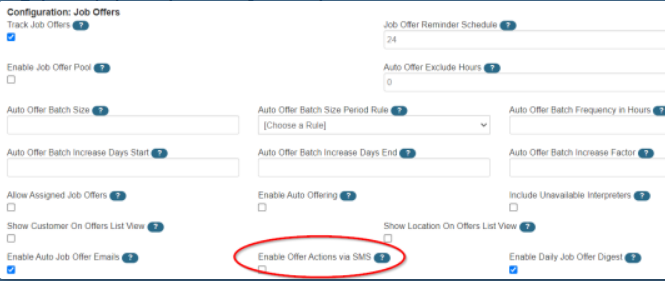
Sending job offers via SMS:
If you send a job offer via SMS and are using Job Offer Reminder notifications, the reminder will be sent to the interpreter in the same medium (SMS or email) as the original job offer.
Only job offers, job confirmations (to the interpreter) and ad hoc SMS messages (to anyone) can be sent via SMS. There is also a send reminder via SMS button as well; it sends a confirm message to the interpreter.
Job offers extended via SMS will show in offer history (Offered tab on Assign page), they will also be shown on the interpreter portal with the offer medium listed as SMS, and the interpreters can accept those jobs when logged in to the portal.
Additionally, if the interpreters respond to the SMS, the responses can be forwarded to the email address of your choosing. The responses will come in as emails and the agency staff can then assign jobs or mark someone unavailable based on the response received. The subject will state "Inbound SMS ...", the message content will be the email body, and the email will come from your default 'From' email address used for all notifications.
SMS character limit:
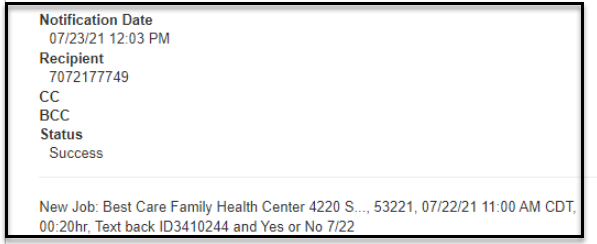
The messages must be 160 characters maximum, otherwise they will not be sent. It is a general SMS industry limit and includes blank spaces.
When offering jobs via SMS from the Assign Interpreter page, the 'Offer Interpreters' popup screen contains a note field allowing the user to add additional information to the SMS message. This note field is part of the 160-character limit in addition to the SMS job offer template itself and can easily exceed the character limit as most SMS job offer templates are about 130 characters. This will cause an error and the SMS offer will not send.
The templates for SMS messages are fully configurable, the same as email templates. We can assist you with that if you want to make any modifications.
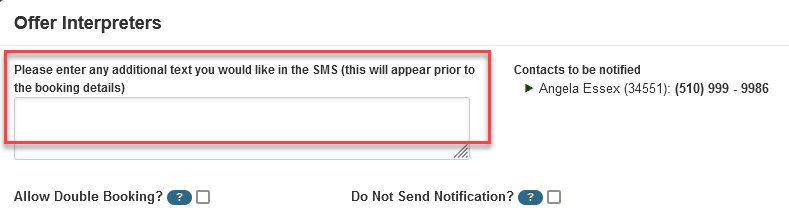
Truncated messages can be used to comply with the 160-character limit
When sending Ad Hoc SMS messaging, the job # does not auto-populate the message. If interpreter responds to the ad hoc SMS, the system displays an Ambiguous Reply.
"Ambiguous Reply" can also be due to incorrect syntax or incorrect case (e.g. Id rather than ID)
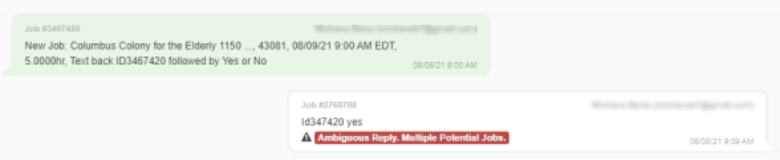 Required Response Format:The interpreter response needs to be "ID347420 yes" verbatim including case sensitive.
